IndustryGuide
How to read documentation and check a crypto project's claims
A verification method: how to separate a description of a mechanism from a promise or marketing, find the date, cross-check numbers between pages and see what is confirmed on-chain and by independent sources.
Key points
- Statements in documentation come in four types: descriptions of mechanisms, claims about properties, promises and marketing; each is checked differently.
- Words like “currently” and “at present” mean a value may change; record the date you checked it.
- Numbers should be cross-checked between pages: even in carefully maintained documentation, they diverge.
- Verified source code confirms a match with the deployed bytecode, not security; an audit applies to a specific version and date.
Contents · 12 sections
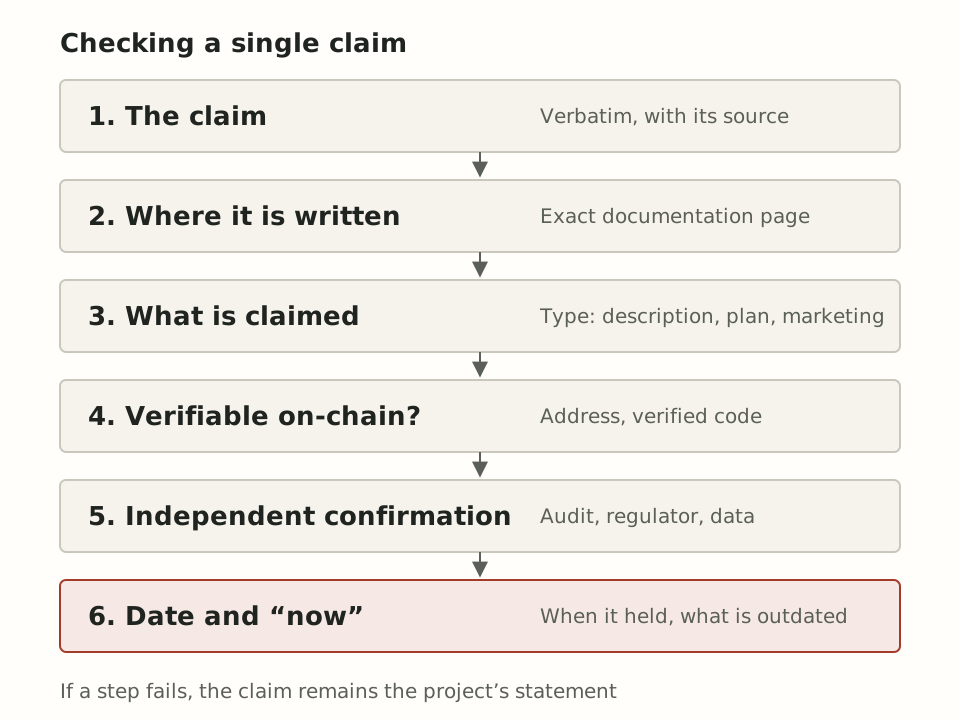
How do you tell what exactly a crypto project claims and which of those claims are backed by evidence? Documentation is best read not as a single text but as a set of separate statements of different types. For each one, you need to find the exact location, the date and a way to check it, and also note what the documentation leaves unsaid.
Below is a ten-step method and a checklist. It is meant for analysis and for understanding how a system works, not for choosing a venue or making investment decisions. The examples come from Variational's documentation: FIELDNOTES is commissioned by the project's team, and we apply the method to the material we work with ourselves. The discrepancies we cite are not accusations but illustrations of what turns up in any living documentation.
Step 1. Separate the product layers
First, determine what the statement refers to: the protocol, a specific application, a product that has not launched or a marketing program. The same sentence can be true of the architecture and false of the working service.
An example. The landing page of Variational's documentation says that the protocol “currently” powers two applications, Omni and Pro. Yet the About Pro page opens with a notice that Pro is “currently not live,” meaning it has not launched yet. And on the Official Links page, Omni's mainnet is marked as being in private beta. The conclusion: the first sentence describes the architecture, not the set of available services. For more on the layers, see “What is Variational: the protocol, its applications and how the ecosystem fits together.”
Step 2. Find the exact page
Cite a specific page, not “the documentation” in general. A secondhand retelling, especially on social media, loses the caveats.
Documentation hosted on platforms such as GitBook (a service for publishing documentation) can change without separate notice, so it is useful to keep a dated copy. Variational's pages, for example, are available in Markdown versions and listed in a shared llms.txt index, which makes it easier to capture a snapshot as of the date of checking.
Step 3. Identify the type of statement
Statements in documentation come in four types, and each is checked differently. A description of a mechanism can be compared against the code and the system's behavior. A claim about properties requires data. A promise can only be checked over time. Marketing is not evidence at all.
| Type | Sign | How to check |
|---|---|---|
| Description | “pools are isolated” | Code, contracts, behavior |
| Claim | “the tightest spreads” | Data and methodology |
| Promise | roadmap, “in Q3” | Only after the fact |
| Marketing | slogans, counters | Not evidence |
An example of a promise with an explicit caveat is Variational's roadmap. It opens by calling itself a “living roadmap” that “should not be viewed as a promised list of features or a commitment to any specific timeline.” That is exactly how roadmap items should be read: as intentions, not as a schedule. Points, referral and competition programs at any project are marketing mechanics: they say nothing about how the product works.
Step 4. Look for dates and the word “currently”
“Currently,” “at present” and “for now” signal that a value may change. Write down next to it the date you read it.
In Variational's documentation as of October 16, 2026, such markers appear, for example, on the share of spreads that goes to the protocol treasury (20%, “still being tested and is subject to change”) and on the liquidation penalty (0.5%, “currently”). In the roadmap, the item “Launch swaps (Phase 2)” is marked as completed, but no completion date is given. The legal pages, by contrast, are dated: the terms of use were updated on September 11, 2026, and the Restricted Persons page on April 20, 2026.
Step 5. Cross-check numbers between pages
The same number can differ from page to page because pages are updated at different times. A discrepancy is a reason not to use the number as a precise fact.
Number of markets: the landing page of the documentation says “over 500,” the OLP page says “about 500,” and the home page of the project's website shows “550+” as of the date of checking. The accurate wording in such a case is “several hundred markets, according to the project.”
The reverse check, for consistency, is also useful. The OLP page links to the address of the protocol treasury, and this address matches the treasury address on the Mainnet Contracts page.
Step 6. Check addresses and code on-chain
If a project publishes contract addresses, you can open them in a block explorer and see whether the source code is verified. This is a check of correspondence, not of security.
The Mainnet Contracts page lists addresses on Arbitrum with links to Arbiscan: the protocol treasury, the main OLP vault, the settlement pool factory and the oracle contract. According to ethereum.org, verification means that the published source code, when compiled with the same settings, produces the bytecode deployed on the network. It does not prove that the logic is correct. Ethereum.org specifically warns that comments and variable names do not affect the bytecode. So with a partial match, currently the most common form of verification, the published code may contain misleading comments and names; a full match closes this gap.
Upgradeability is another question. If a contract follows a proxy pattern, the user interacts with one address, while the logic sits in another contract and can be replaced. Ethereum.org states the consequence directly: users have to trust developers not to modify the contract arbitrarily. That is why it is worth checking who can carry out an upgrade and whether there is a delay before it takes effect.
Step 7. Read the scope and date of the audit
The phrase “the project has been audited” means little without the report. An audit applies to specific contracts, in a specific version, on a specific date.
Variational's audits page lists two reports: Zellic (completed in December 2024) and Spearbit (March 2025). When reading any report, look for the list of contracts reviewed and the code version, the list of issues found and the status of their fixes. Then compare the dates with the features that appeared later. A bug bounty program, run through Immunefi in Variational's case, complements an audit, but the terms and scope of the program should be checked on the platform's own page.
Step 8. Find the legal pages
The terms of use, the privacy policy and the list of jurisdictional restrictions show who provides the service, on what terms and who bears the risks. Their absence is information in itself.
Variational has such pages. Restricted Persons lists the territories and categories of persons to whom the service is not provided. The terms of use, among other things, reserve the company's right to introduce new fees by notifying users through the platform or public channels. Clauses like these matter more for understanding the terms than the wording on the home page.
Step 9. Look for independent confirmation
Independent confirmation means auditor reports, regulatory documents, research and blockchain data that you can check yourself. A media outlet repeating a project's claim is not confirmation.
An example of caution: the Additional Resources section of Variational's documentation collects external articles and podcasts, but the selection is made by the project itself, and it includes interviews with the team. Another example is the project's post on X dated July 6, 2026, about spreads narrowing by 20% or more on three markets. This is a claim by the project, and the sources we reviewed contain no independent data on it; for more context, see “Swaps on Variational: what changed in 2026 and how they differ from perps.”
Step 10. Note what is not disclosed
Missing information is not an accusation but a list of questions. Write down what you did not find, and do not fill the gaps with guesses.
As of the date of checking, Variational's documentation does not disclose, for example, the oracle weighting methodology, and OLP's strategy is described as proprietary. In the documentation snapshot, we also did not find a description of contract upgrade rights. For more on why such questions matter, see “DeFi protocol risks: from smart contracts to counterparties.”
Checklist
- Which layer does the statement belong to: protocol, application, unlaunched product or marketing?
- Where is the exact page, and has a dated copy been saved?
- Is it a description, a claim, a promise or marketing?
- Does it say “currently” or “now,” or give an update date?
- Does the number match on other pages and on the website?
- Are contract addresses published, is the code verified, is there a proxy and who can upgrade it?
- What does the audit cover, which version, which date?
- Are there terms of use and jurisdictional restrictions?
- Who, other than the project itself, confirms the statement?
- What does the documentation not say?
Conclusion
Checking documentation is not a search for a single verdict on a project but a sorting exercise: what is described and verifiable, what is claimed without data, what is promised without a deadline and what is not disclosed. Living documentation almost always contains discrepancies and outdated passages, and on their own they say nothing about good or bad faith. What matters more is how easy it is to verify a statement and whether it has confirmation beyond the project's own words. The result of such a check is not a judgment of whether something is “worth it” but a list of what is confirmed, what is claimed and what remains to be found out. More articles on how the industry works are in the Industry section.
Sources
Spotted an error? Tell the editors — we will check it and publish a correction.
How we handle correctionsGet new articles by email
New articles and corrections, no more than once a week. No ads for trading services, no promo codes and no offers to open an account.